

Conditional Branches
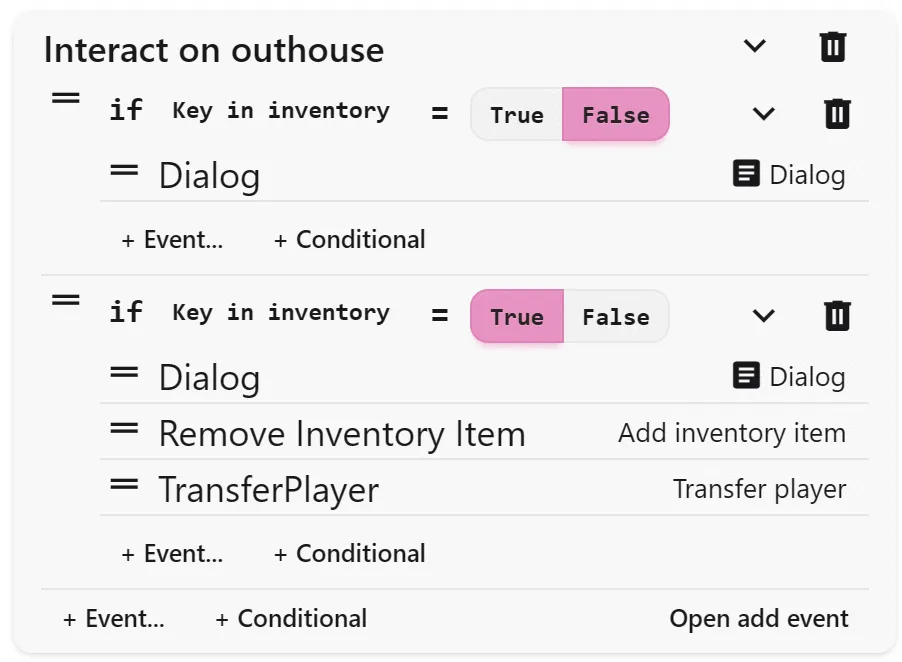
Conditional branches let your actions respond to the player’s behavior. They check variables or inventory and decide what happens next. If the condition is true, one set of actions plays; if false, those actions are skipped.
Common Uses
Section titled “Common Uses”- Checking if the player has a key before opening a door
- Changing dialogue if the player has already met an NPC
- Triggering different endings based on player choices
- Unlocking puzzles only if certain switches are active
Variables
Section titled “Variables”To use conditionals, first create variables in the Assets page. Variables cannot change type once created. Types include:
- Switch: On or off (true/false)
- Number: Any numeric value
- Text: A string of characters
Update values with the Set Variable action. Clear names like hasKey or metNPC help keep track as projects grow.
Adding a Conditional
Section titled “Adding a Conditional”Click + Conditional in the action list. Add your condition, then place actions inside each branch. Conditions are tested in order, so the first true condition runs its actions.
You can check for:
- Switch variables: True or false values
- Number variables: Greater, less, or equal to a number
- Text variables: Matches specific text
- Inventory items: Whether the player has or does not have an item